Posts

Showing posts with the label SharePoint

SharePoint Framework (SPFx) - SharePoint Hackathon 2025

Image
 

Transforming Employee Experiences - SharePoint Hackathon 2025

Image
 

SharePoint Agents - SharePoint Hackathon 2025

Image
 

SharePoint portals - SharePoint Hackathon 2025

Image
  SharePoint Portal 

Kickoff - SharePoint Hackathon - 2025

Image
  Kickoff to Innovation: SharePoint Hackathon Launch  https://www.youtube.com/live/XtpB1bEH5oo https://aka.ms/SharePoint/Agents/Trial http://aka.ms/SharePointLookBook http://aka.ms/SharePointEvent http://aka.ms/spfx

SPFX error Object is possibly null while using this.domElement.querySelector

Image
This post is specific to how to oversome object is possibly null issue in SPFx. I have created one simple webpart to display SharePrice. On the fly, it is going to call API and get the value and display it inside the DIV tag. As simple as that.  Below the part of the HTML in the  render() method:         <div>             <h5>SharePrice</h5>             <div name="currprice"></div>           </div>         </div>           </section>` ;     this ._getSharePrice(); Below the line of code I used to display the dynamic share price  : this .domElement.querySelector( '#currprice' )?.textContent = `Current Price: $ ${ sharePrice } ` ; This throws me below error saying object is null. Even there is single DIV elememt, still the error exist.       ...

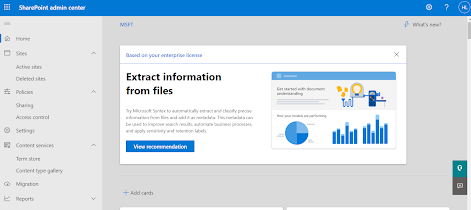
SharePoint Admin Center

Image
 SharePoint Admin Center allows you to view your organization's SharePoint site including communication sites, channel sites, and sites that belong to Microsoft 365 group. This is same like Site Admin in earlier days of SharePoint versions. You can search organizational site, sort them or filter sites the way you want. Easy way to find and apply/change site settings. Under Policies, click on Sharing - This will allow you to create rules/ set control sharing at the organization level in SharePoint and OneDrive Here, in this page, you can apply settings to restrict how users are allowed to access content in SharePoint and OneDrive. Term store, the word getting populated from SharePoint 2010. You can feed metadata of metadata information of your organization level, program level, project level in Term store. helps your organization's knowledge better.  AI soon will play a vital role here and using AI, you can acyually find collect and process and finally yoour organization's d...

SharePoint Framework Reference Guide

SPFx stands for SharePoint Framework -  https://learn.microsoft.com/en-us/javascript/api/overview/sharepoint?view=sp-typescript-latest   Below are the packages of SPFx and we are using them while using SPFx framework for development in our day-to-day activities. .'@microsoft/decorators' - https://learn.microsoft.com/en-us/javascript/api/decorators?view=sp-typescript-latest '@microsoft/sp-core-library' - https://learn.microsoft.com/en-us/javascript/api/sp-core-library?view=sp-typescript-latest '@microsoft/sp-component-base package' - https://learn.microsoft.com/en-us/javascript/api/sp-component-base?view=sp-typescript-latest '@microsoft/sp-application-base package' - https://learn.microsoft.com/en-us/javascript/api/sp-application-base?view=sp-typescript-latest '@microsoft/sp-dynamic-data package' - https://learn.microsoft.com/en-us/javascript/api/sp-dynamic-data?view=sp-typescript-latest '@microsoft/sp-extension-base package' - http...

New Approach to Migrate Workflow into SharePoint Online - Automate Workflow Solution Creation - SPMT Feature

SharePoint migration is a continuous process in this business platform. Organization who are using SharePoint for a while need to start thinking at some day for migrating their data from lower version to upper version of SharePoint. Migration is one of the evitable project of most of the Organization. Migrating from On-Premises to On-Premises like MOSS 2007 to SP2020, or SP2010 to SP2013/2016/2019 is one path, and there is another path which is from SP2010/2013/2016/2019 to SPO (SharePoint Online). Content migration is the simple one rather than migrating content with custom application. Migration approach and the plan needs to be perfect for a successful migration. Considering SP2010 or SP2013 or SP2016 environment, there must be workflow presence and it could be integrated with document library, or list or might be site itself. These workflows might be SharePoint Designer Workflow, or Out-Of the-Box workflow or workflow created by any tool like Nintex.  Converting existing workfl...

Quest error resolution of Enhanced Security Configuration and Unable to authenticate with Office 365

Image
Migration is one of the horizontal line of business in SharePoint scope of work. Most of us having idea about migrating content and application from lower SharePoint version to higher version, or from on-prem to cloud. Many of us also familiar with non-SharePoint platform like Documentum or Lotus Notes to SharePoint migration. At very initial days, like SharePoint V2.0 i.e. WSS 2.0, we have seen and experienced mostly from non-SharePoint version to SharePoint version. Latter on, we have seen mostly from lower version to SharePoint higher version or to SharePoint online. Migrating from Lotus Notes to SharePoint is little bit more complicated, however there is one 3rd party tool named Quest . They have line of tools/product which can help you to migrate your stuff from Lotus Notes to Exchange/SharePoint/Office 365. Here the url for have a look at it -  https://www.quest.com/migration-manager/

Notes on Event Handlers in SharePoint Add-Ins

In SharePoint 2010 world, most of the custom SharePoint application used EventReceiver . This guy played a vital role during that timeframe. EventReceiver is very simple. You can consider this as based on your trigger event, what action you want to execute – this could be a validation, schema change, item entry, workflow initiation, or even communicate with other application. In respect to SharePoint Online, we call this as RemoteEventReceiver(RER) . Same utilization through different channel. SharePoint Online utilize different DLLs, interface, and the implementation through add-ins. In this post, I walk through some notes about RemoteEventReceiver(RER) . Provider-hosted Add-ins Custom code can handle three categories of events in provider-hosted add-ins: ·        List events, such as the adding or deleting of a list on a website. ·        List item events, such as the editing of an item in a list. ·  ...

Upcoming top five O365/SharePoint features in my opinion

Here are top five Office 365/SharePoint features in my opinion. A few already released and few are on the way and will be rolled out very soon. Enable the communication site experience on classic team sites - Communication site is being used for sharing information like corporate news, reports, announcements, townhall news and other information in a visually compelling format. Microsoft now allowing classic team site can have this feature. This is done by a very easy tweaking thing and just running a PowerShell cmdlet( Enable-SPOCommSite -SiteUrl <URL of target site> ), turn your modern communication site features to your classic team sites.

Information Right Management configuration in SharePoint

Image
This post is for Information Right Management in O365/SharePoint. It is self explanatory based on the images. We' have two major areas - a) Site Collection level, b) Site Content level. Here the url to set Retention Policy in Site Collection level - https://<<SPO Site Collection URL>>/_layouts/15/policylist.aspx Below the steps - how you can set Retention Policy in Content Type level This is pretty simple. Only thing is you play around the configuration and set the rule there. Hope this will helps you!

PowerApps Notes – Part 1

Now, we are era of Power family – PowerApps , SharePoint , Power BI . And, I tagged it as P3  This is a great combination framework to develop business apps in scalable format. Obviously, We have support of another great technology seed – Microsoft Flow.  Mind-blowing workflow integration in easy step-by-step manner. Thank You Microsoft! This post mainly focuses on PowerApps, and I choose this as first place because it is new and getting some insight of it will help others as well. People who already work on this technology and facing issues or who just started working on it, will be most benefited. It is very simple (simpler than InfoPath) and easy to learn. Going through some key points on different PowerApps development areas here. Data Sources Data Sources are external information stored in cloud In and most canvas apps use external information. The most common data sources are tables and list hosted on O365 or on-premise SharePoint environment. Data sources o...

Document ID and Document Set updation

Image
Document ID , a SharePoint service provides unique ID to individual document in library. You can activate this service by enabling site collection feature - Document ID settings. Document Set is used for content organizer. This is being used to set/tagged a group of  related documents in the library. Like, all documents related with LAW or HR or Product 24.5. This has been earlier SharePoint 2010 and it is a kind content type. This is site collection feature and you can find it as Document Sets . What is doces internally is created a folder (based on the document tag) and keep the related documents there. If you use both the Document Set and Document ID , then every Document Set also having an unique ID (as these are related folders resides under library) same as individual document do have. During migration, sometimes DocumentID not migrated properly by different major migration tools. Could be because Document Set not migrated properly and related documents (under that D...