Posts

Showing posts with the label DevOps

How to setup custom notification in Azure DevOps

Image
In this post, I'm going to walk through how you can utilize Azure Notification services in most optimum way. By setting your custom notification, you can actually manage your team, the flow of the task/work executing, and you will be top of every important change which is happening in your DevOps board. Let's start by visiting your Azure DevOps portal and then go to Project Settings and then Notification under General . Here, you will found all pre-built notification. All useful and most common pre-built you can find there like ' Build completed ',  ' Deployment Pending ', ' Release Approval ', ' Deployment Completed ' etc.
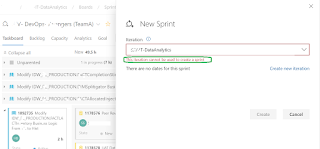
Azure DevOps error message - Iteration cannot be used to create sprint.

Image
This is one common error message I have identified in Azure DevOps platform. I was supposed to create a new sprint session under a new team/project. While trying to create the sprint, Azure DevOps threw me the below error information saying " This iteration cannot be used to create Sprint ".

Power BI report from Azure DevOps Board

Image
Today, will discuss on how to make connection from Power BI to Azure DevOps(services) and how you can start preparing the basis reports in Power BI. Here is my favorite Microsoft Link - https://docs.microsoft.com/en-us/azure/devops/report/powerbi/create-quick-report?view=azure-devops Let’s start and these are very simple steps I’m going to mentioned here.  Open Power BI >> Click on Get data >> Search DevOps Or you can click on ‘ Online Services ’ >> Choose Azure DevOps(Boards Only) .

Azure DevOps error - TFS.WebApi.Exception: An undefined error occurred

Image
This error raised during my work with Azure DevOps board. After creating one feature, I was busy to create related couple of user stories under that feature and suddenly  I face this error. Initially, a few user stories I was able to create and linked under the feature, and then I fill up the story form, linked this with parent feature and click on submit. Popup appeared and throwing the below error: Here the error information in text format.

How to place JOIN in Azure DevOps QueryEditor

Image
Azure DevOps provides a feature called Query Editor where you can put your query using simple UI and run this. Simple query can be place/create here very easily. Complex query like join query would be a tricky one. Here, I tried to simplify how we can design a join query using Query Editor. Let's say I want to see all the bugs which already got closed or resolved by my team. Here, we know which ADO field is what for. For example ADO field AreaPath represents project team. In SQL term it is like SELECT * FROM MT-DEVOPS-PROJECT-DATA WHERE PROJECT=My-Project AND TYPE='Bug' AND (STATUS = 'Resolved' OR STATUS = 'Closed'  OR STATUS = 'Completed')

How to fix Azure DevOps Error CS0579

Image
During build process of one ASP.NET web application in Azure DevOps environment, I face the error  CS0579 multiple times. Everything looks great to me, but continuous crappy error keep saying issues in AssemblyInfo.cs file. Below are few red error I have face during setup this project. "SharePointServicesWebApp\Properties\AssemblyInfo.cs(8,12): Error CS0579: Duplicate 'AssemblyTitle' attribute" ##[error]SharePointServicesWebApp\Properties\AssemblyInfo.cs(9,12): Error CS0579: Duplicate 'AssemblyDescription' attribute ##[error]SharePointServicesWebApp\Properties\AssemblyInfo.cs(10,12): Error CS0579: Duplicate 'AssemblyConfiguration' attribute ##[error]SharePointServicesWebApp\Properties\AssemblyInfo.cs(11,12): Error CS0579: Duplicate 'AssemblyCompany' attribute I was quite sure there is something coming up during build process and make this as duplicate. Because this build process also provides assembly information other way rou...

How to fix Azure DevOps error MSB4126

Image
Setting up build and release pipeline always tedious and we face many build related issues. Here is one common error I face couple of times while setting app Web or windows apps in Azure DevOps After placing the code in repos, and creating the build pipeline and run it, you can face the following error ##[error]D:\a\8\s\<your solution file>.sln.metaproj(0,0): Error MSB4126: The specified solution configuration "release|$(BuildPlatform)" is invalid. Please specify a valid solution configuration using the Configuration and Platform properties (e.g. MSBuild.exe Solution.sln /p:Configuration=Debug /p:Platform="Any CPU") or leave those properties blank to use the default solution configuration. To understand what is target platform defined in your project you need to visit or open the solution(.sln) file and review the following sections. In my case, this has been defined as x86 as target platform.         ...