Posts

Experience in Power Apps Express Design

Image
Express Design feature in PowerApps let you quickly build an app within a few clicks. Advantages here is you build an app by reading an image. Just like PDF scanner, read your image, identify what is what, and transform and build at the background effectively.  Easy, huh! I was excited as well   Well, this post is my 10 minutes effort what I found. Initially I started with a complex image setting my high expectation to Power Apps family. I went ahead and prepare to build from image in Power Apps portal. My first experimental UI was a pure .NET application having wonderful UI with more than 160 controls sitting on the same page. I took a screenshot of it and let Power Apps to play around it.   At the very begging Power Apps let me know this is too heavy. Recomended approch is to have within 30 controls in UI. I keep more than 30 and went ahead to see how it works. This is standrad UI which initially ask whether you would like to create a Dataverse table now, or latter...
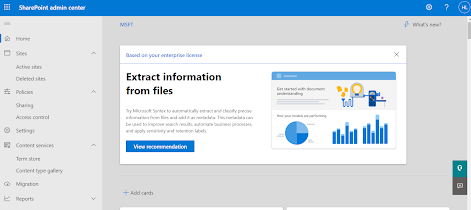
SharePoint Admin Center

Image
 SharePoint Admin Center allows you to view your organization's SharePoint site including communication sites, channel sites, and sites that belong to Microsoft 365 group. This is same like Site Admin in earlier days of SharePoint versions. You can search organizational site, sort them or filter sites the way you want. Easy way to find and apply/change site settings. Under Policies, click on Sharing - This will allow you to create rules/ set control sharing at the organization level in SharePoint and OneDrive Here, in this page, you can apply settings to restrict how users are allowed to access content in SharePoint and OneDrive. Term store, the word getting populated from SharePoint 2010. You can feed metadata of metadata information of your organization level, program level, project level in Term store. helps your organization's knowledge better.  AI soon will play a vital role here and using AI, you can acyually find collect and process and finally yoour organization's d...

Azure Well-Architected Framework meeting notes

Image
Microsoft conducted session on Well-Architected Framework(WAF) and below are the polints I was just able to captured . Points are from second pillar i.e. Security to fifth pillar i.e. Performance Effitiency . Reliability is the first pillar which I missed to take the notes. However, you can visit Microsoft site and go through it -  https://learn.microsoft.com/en-us/azure/well-architected/reliability/ Security Pillar Cost Optimization Pillar Operational Excellence Pillar Performance Efficiency Pillar Hope the meeting notes will help you :)